Skip to content
Menu

Review

Spotlightr review

A secure, well-liked course and marketing video host, formerly vooPlayer. Whether it is real, what it costs, how good the piracy protection really is, and the one direct-response job it leaves to you.

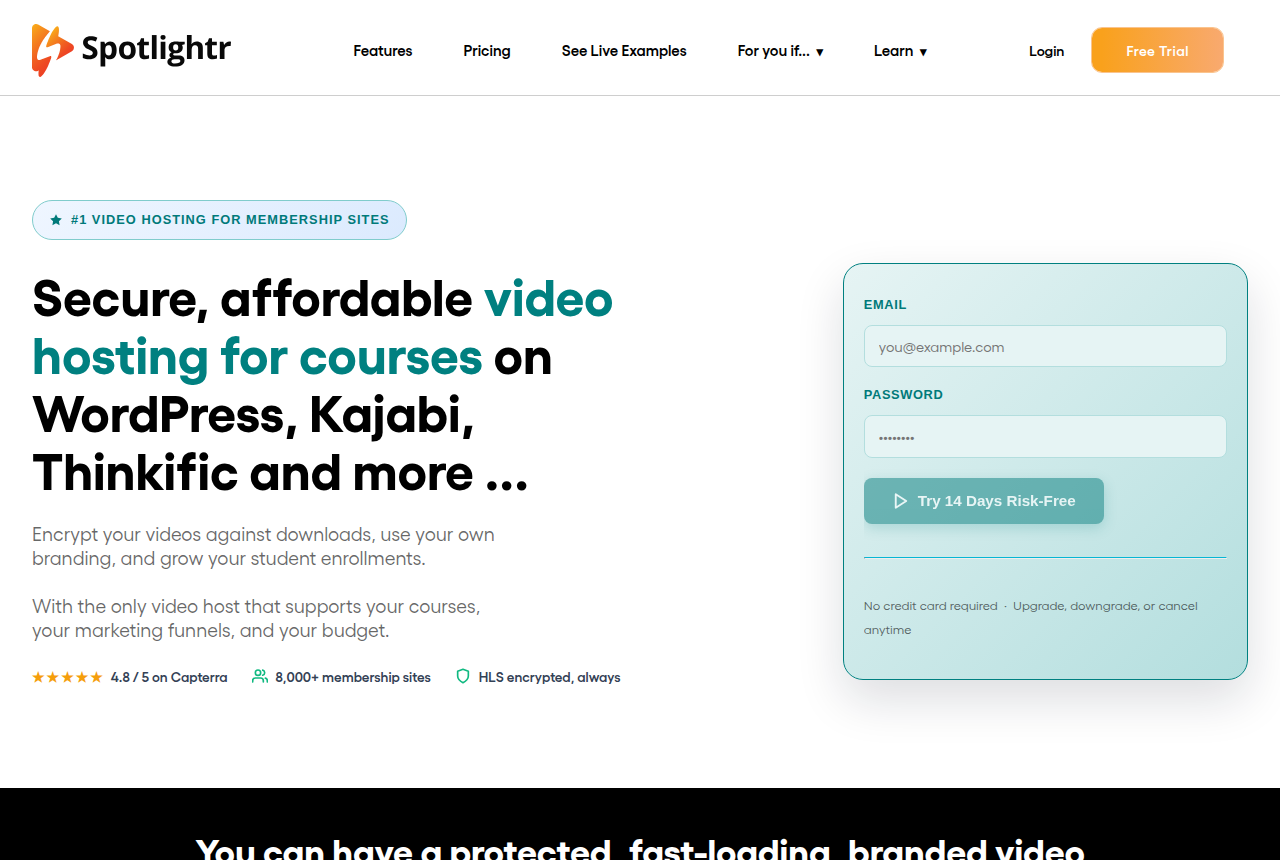
Spotlightr homepage headed "Secure, affordable video hosting for courses on WordPress, Kajabi, Thinkific and more" with a Try 14 Days Risk-Free email sign-up form and a 4.8 / 5 on Capterra, 8,000+ membership sites, HLS encrypted trust bar

By Marcus Vale, Lead reviewer. Reviewed by the VSLBench editorial desk. Last updated 24 September 2026, with prices rechecked every 90 days.

Starts at
$13/mo (Light, billed annually)
Free plan
No, a 14-day trial with no card
Content protection
HLS encryption, IP watermark, domain lock
Marketing tools
Lead forms, CTAs, email/SMS/Stripe gating
Sales-scored A/B
No, and no revenue attribution

Quick answer

Spotlightr is our top pick for most people. Spotlightr is the pick if you sell courses or run marketing videos and want secure, branded hosting with lead capture and analytics for a fraction of a Wistia bill, and you can live without scoring a split test on the sale. Formerly vooPlayer, it wraps every uploaded video in HLS encryption against downloads, gives you a brandable player and watch page on every plan, and does hybrid hosting, so you can keep files on YouTube, Amazon S3 or Dropbox and still use its player. On top sit the marketing tools most cheap hosts skip: in-video lead-capture forms, clickable CTA overlays, email, SMS, password and Stripe-paywall gating, viewer heatmaps, CRM tags and tracking codes. Plans are flat and public, from $13 a month billed annually, with a 14-day trial that needs no card and a 30-day refund window. Two honest limits. Its analytics stop at engagement: there is no split test scored on sales and no revenue attribution, so on a paid-traffic VSL you still cannot prove which traffic bought. And the independent review base is warm but thin (4.8 on Capterra across 52 reviews, 4.3 on G2 across 29), with recurring notes on a settings learning curve and a file-by-file upload workflow.

  • Spotlightr. Best for secure, branded course and membership video. From $13/mo.

You have probably seen Spotlightr recommended in a course-builder thread, or as the cheaper way off Wistia, and the question is the honest one: is it real, and will you regret moving your videos onto it? The short version is that Spotlightr is real and long-running. It launched as vooPlayer in 2013 and rebranded in 2020, it is a service of Zimmplify LLC, and it hosts video for what the vendor puts at more than 8,000 membership sites. The risk is not that it is a scam. It is buying it for a job it does not do.

Spotlightr is a secure video host with a marketing layer, built for course creators and marketers. Every upload is HLS-encrypted against downloads, and you get a brandable player and watch page on every plan, plus hybrid hosting, so you can keep your files on YouTube, Amazon S3 or Dropbox and still play them through the Spotlightr player ad-free. On top sit the tools most cheap hosts skip: in-video lead-capture forms, clickable CTAs, email, SMS, password and Stripe-paywall gating, viewer heatmaps and session tracking, in-video quizzes, CRM tags and a free WordPress plugin with a LearnDash integration. For a paid course or a membership site, that is a lot of platform for $13 a month.

Where a paid-traffic marketer has to be careful is measurement. Spotlightr can fire a CTA, gate a video and tag a contact, but its analytics stop at engagement: there is no split test scored on sales and no revenue attribution, so on a video sales letter you still cannot prove which traffic actually bought. That is the job a dedicated VSL player does, and it is the one Spotlightr leaves to you. This review is about telling a secure course-and-marketing host apart from a conversion tool, and about the operational rough edges long-term users report before you commit.
What works

  • HLS encryption with polymorphic access tokens on every upload, plus domain locking, dynamic IP watermarks, one-time plays and GeoControl, so course content is genuinely hard to rip
  • Marketing hooks most hosts skip: in-video lead-capture forms, clickable CTA overlays, and email, SMS, password or Stripe-paywall gating
  • Branding on every plan (player, watch page and a custom domain) and hybrid hosting, so you can keep files on YouTube, S3 or Dropbox and still use the Spotlightr player
  • Flat, public pricing from $13/mo billed annually, a 14-day no-card trial and a 30-day refund window, with fast support praised across Capterra (4.8) and G2 (4.3)
  • A free WordPress plugin with a LearnDash integration, in-video quizzes with progress tracking, and analytics with viewer heatmaps and session tracking

What to watch

  • No sales-scored A/B testing and no revenue attribution: the analytics stop at engagement, so a paid-traffic VSL cannot prove which traffic actually bought
  • The independent review base is warm but thin, 52 reviews on Capterra and 29 on G2, so there is less long-term proof to check than for Wistia or Vimeo
  • Feature depth comes with a settings learning curve, and reviewers say a specific option can be hard to find
  • Uploads go one file at a time and some report slow playback startup, to the point that a Reddit user advises pre-compressing footage with Handbrake before upload
  • Every plan caps bandwidth and storage, with overages billed at $0.05/GB bandwidth and $0.03/GB storage, so a high-traffic library outgrows the cheap sticker

What users actually say about Spotlightr

Research: unverified

Support is the most praised thing about it ↑ frequently praised

Across Capterra (4.8 from about 52 reviews) and G2 (4.3 from about 29), the recurring positive is responsive, helpful support and, for most users, an easy-to-use player. Capterra rates customer service 4.8.

“Customer Service is spot on.”

Anonymous Capterra: Spotlightr Reviews | Capterra

“User friendly interface, unbeatable support.”

Anonymous G2: Spotlightr Pros and Cons | G2

The interface splits people: friendly to some, scattered to others

Many find it user-friendly, but a real strand of reviews describes settings that are hard to find and advanced options buried, up to one Capterra reviewer calling it a confusing experience. Discoverability, not capability, is the complaint.

“User friendly interface, unbeatable support.”

Anonymous G2: Spotlightr Pros and Cons | G2

“confusing and terrible user experience”

Anonymous Capterra: Spotlightr Reviews | Capterra

“advanced options are a little hidden”

Anonymous G2: Spotlightr Pros and Cons | G2

Playback is usually smooth, but reliability proof is thin and downtime happens

Most users report smooth, glitch-free playback. But the public review base is small, and the sharpest negative is an outage report on Trustpilot; Spotlightr's own status page logged brief database and migration slowdowns in September 2026. Good on average, worth planning a fallback around.

“no buffering, no glitches”

Anonymous Capterra: Spotlightr Reviews | Capterra

“downtime from time to time”

Anonymous Trustpilot: Spotlightr Reviews | Trustpilot

What users say

The praise is consistent, and it is about value and support. Spotlightr sits at 4.8 out of 5 across 52 Capterra reviews and 4.3 across 29 on G2, with support the most repeated compliment on both. One G2 reviewer sums the pattern up: "User friendly interface, unbeatable support." In an r/elearning thread on hosting large course videos, a user recommended it plainly: "We use Spotlightr, they seem to fly under the radar. Pricing is transparent, great customer service." The through-line is a cheaper Wistia and Vimeo alternative that course sellers quietly stick with.

The criticism is worth taking seriously, and it is about the day-to-day, not the product being fake. The most common gripe is the upload workflow: as one G2 reviewer put it, "I need to upload file by file," and the same r/elearning user advised pre-compressing footage with Handbrake before upload. The other recurring note is the settings learning curve, with a Capterra reviewer finding it "hard to find specific settings" among so many options, and a few reports of slow playback startup. None of that is a dealbreaker; all of it is a reason to run your real workflow through the free trial first.

Pricing

Prices read on Spotlightr's own pricing page on 23 September 2026. Plans are flat and public; the figures below are the annual per-month rate. Monthly billing is higher: $15, $25, $65 and $195. Every plan encrypts and brands your video, so the tiers differ mainly by limits and the course, quiz and team features they unlock.

Plan Annual Storage / Bandwidth What it unlocks
Light $13/mo 50GB / 200GB 25 videos, HLS encryption, brandable player, heatmaps, CTAs, lead forms, WordPress and LearnDash, domain protection
Plus $21/mo 200GB / 600GB Unlimited videos, Course and Gallery modules with Stripe access, student reporting, dynamic IP watermark, email gating, password protection
Premium $55/mo 600GB / 2TB In-video quizzes, advanced analytics, CRM tags, tracking codes, 5 team accounts, in-video comments, GeoControl
Scale $163/mo 2TB / 6TB Everything in Premium, with 20 team accounts

The caps are the number to watch, not the sticker. Bandwidth over your monthly limit bills at $0.05 per GB and extra storage at $0.03 per GB, so a course library with heavy replay or long HD lessons can outrun the plan. The 14-day trial needs no credit card, and paid plans carry a 30-day refund window.

Changelog

  • 24 Sep 2026 — First published. Read Spotlightr's own homepage, pricing and features pages for what it is and what it costs, gathered long-term user reports from Reddit, G2 and Capterra, verified the flat plan prices and overage rates shown, and confirmed the vooPlayer-to-Spotlightr history and the Zimmplify LLC ownership.

Frequently asked questions

Is Spotlightr legit, or too obscure to trust?
It is real and long-running. It started as vooPlayer in 2013, rebranded to Spotlightr in 2020, and it is a service of Zimmplify LLC. The vendor says it hosts video for more than 8,000 membership sites and publishes a live status page, and independent reviews are warm: 4.8 out of 5 across 52 reviews on Capterra and 4.3 across 29 on G2, with support the most consistent praise on both. The honest gap is depth, not legitimacy. The review base is thin next to Wistia or Vimeo, so pilot it on a non-critical course before you migrate a large library.
Is Spotlightr good for a VSL?
As a marketing host, partly. It ships the front-end hooks a sales video wants: clickable CTA overlays, in-video lead-capture forms, email, SMS and Stripe-paywall gating, and viewer heatmaps. What it does not do is score a split test on sales or attribute revenue, so on a paid-traffic sales letter you still cannot prove which traffic actually bought. It is built for secure, branded course delivery with marketing overlays, not for the cart-level attribution a dedicated VSL player like Vidalytics gives you.
How much does Spotlightr cost?
Plans are flat and public. Billed annually the per-month rates are Light $13, Plus $21, Premium $55 and Scale $163; billed monthly they are $15, $25, $65 and $195 (checked 23 September 2026). Every plan includes HLS encryption, a brandable player and analytics with heatmaps; the Course and Gallery modules and dynamic watermarking start on Plus, and quizzes, CRM tags and team seats on Premium. There is a 14-day trial with no card and a 30-day refund window. Watch the caps: bandwidth overage bills at $0.05 per GB and extra storage at $0.03 per GB.
Does Spotlightr actually stop people downloading my course?
That is its headline feature. Every upload is HLS-encrypted and protected with polymorphic access tokens, which blocks the browser-extension downloaders that defeat an ordinary embed. You can layer on domain locking, password protection, one-time plays, GeoControl and a dynamic IP watermark that animates the viewer's IP over the video to deter screen recording. No system stops a determined screen-recorder, but this is a real deterrent stack, and it is the main reason course sellers pick it over Vimeo or YouTube.
What is the catch with Spotlightr?
Two, mostly. Its analytics measure engagement, not sales, so it will not tell you which ad, audience or creative actually bought. And the day-to-day has rough edges reviewers keep naming: a settings learning curve because there are so many options, a file-by-file upload workflow, and occasional slow playback startup that one r/elearning user works around by pre-compressing footage with Handbrake. Neither is a reason to avoid it. Both are reasons to run your real workflow through the free trial first.

Sources

From Spotlightr

Other sources

6 discussions and reviews read for this page. Quotes are excerpts; open a link to read the original in context.

  1. [] Spotlightr home (vendor) Blog
  2. [] Spotlightr pricing (vendor) Blog
  3. [] Spotlightr features (vendor) Blog
  4. [] Video streaming choice (r/elearning) Reddit
  5. [] Spotlightr reviews on G2 (4.3/5, 29 reviews) G2
  6. [] Spotlightr reviews on Capterra (4.8/5, 52 reviews) Capterra

Related reading

Marcus Vale

Written by

Marcus Vale

Lead reviewer

Marcus Vale runs the VSLBench review desk. He has spent years buying paid traffic to video sales letters, and he now reads the player docs, pricing pages and long-term user reports to work out which tools actually move sales instead of just counting views. He writes the player and attribution reviews here, and he is the reason every ranking has to name the tool it is wrong for.

marcus@vslbench.com

Last checked 2026-09-24