Skip to content
Menu

Review

Vidalytics review

The VSL player built for direct response. What it does, what it costs, whether its API does what you need, and who it is wrong for.

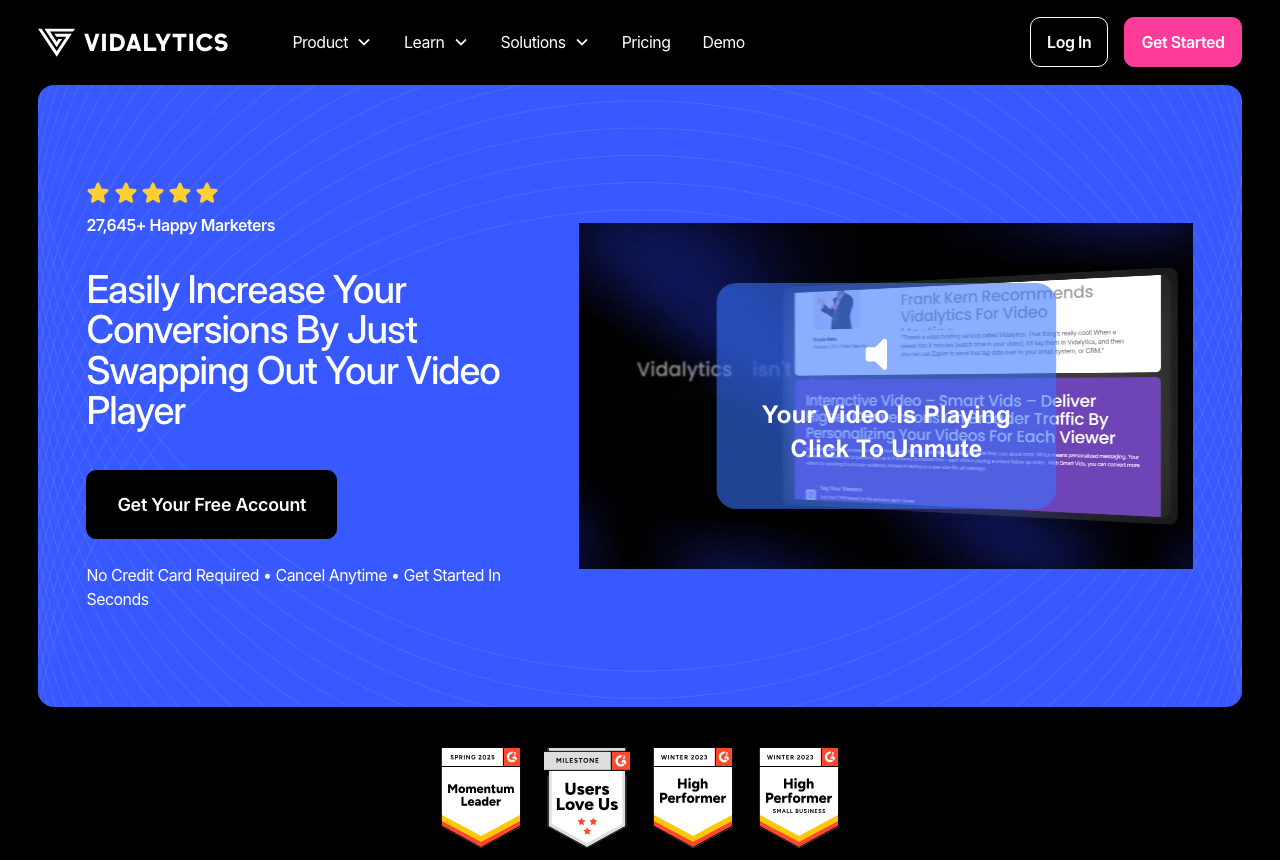
Vidalytics homepage showing its marketing-focused video player and analytics pitch

By Marcus Vale, Lead reviewer. Reviewed by the VSLBench editorial desk. Last updated 14 September 2026, with prices rechecked every 90 days.

Starts at
$24/mo ($19 annually)
Free plan
Free Forever, 3 videos
Developer API
REST API on Premium; player API on all plans
Conversion tracking
Second-by-second, revenue-attributed
A/B testing
Native, scored on sales

Quick answer

Vidalytics is our top pick for most people. Vidalytics is the pick if you run paid traffic to a video sales letter and need to score split tests on sales, not views. It is the most complete VSL player of this group for direct response. On the front end you get smart autoplay, resume play, timed CTAs and play gates; on the back end, a second-by-second engagement graph, heatmaps, buyer-versus-non-buyer segmentation, conversion and revenue tracking, and native A/B tests scored on clicks, conversions or revenue. It fires watch-behavior events to Meta and Google for retargeting. There is a Free Forever plan to try it, and paid plans start at $24 a month ($19 billed annually), cheaper to start than Wistia. The catch is bandwidth: paid plans include a monthly allowance and bill overages at $0.33 per GB, so a high-traffic VSL can cost more than the sticker price.

  • Vidalytics. Best for mature VSL campaigns. Has a free tier.

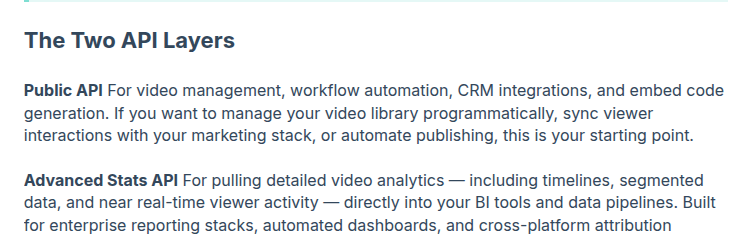
Yes, Vidalytics has an API, and it is more than a single endpoint. There are two layers. A client-side Player API runs on every embed and lets you listen for events (play, pause, timeupdate, ended, CTA and Play Gate) and drive playback, on any plan. A server-side Public REST API, plus an Advanced Stats API, lets you manage videos, generate embed codes, sync viewer events to a CRM and pull analytics into a BI tool, and that layer starts on the Premium plan. If your requirement is "does it let me automate embeds, sync watch events and export stats programmatically," the answer is yes, with a plan floor to know about.

That answer only matters because of what the API sits on top of. Vidalytics is a video player built for direct response, not a general host. If you buy paid traffic to a video sales letter, your question is never "where do I put the video." It is "which player gets more people past the pitch, and lets me prove which traffic buys." Vidalytics is built to answer both.

On the front end you get the conversion controls: smart autoplay, resume play, timed CTAs and play gates. On the back end you get the data most hosts do not have: a second-by-second engagement graph, heatmaps, buyer-versus-non-buyer segmentation, conversion and revenue tracking, and native A/B tests scored on sales rather than views. It fires watch-behavior events to Meta and Google so the ad team can retarget on who actually watched. The API is the layer that lets a bigger operation wire all of that into the rest of its stack.

There is one honest catch, and it is not the API. It is bandwidth: paid plans include a monthly allowance and bill overages at $0.33 per GB, so a high-traffic VSL, with bots and cheap clicks in the mix, can cost more than the sticker price. Size the plan to your volume before you point real spend at it.
What works

  • Purpose-built VSL controls: smart autoplay, resume play, timed CTAs, play gates
  • Second-by-second engagement graph, heatmaps and buyer/non-buyer segmentation
  • Conversion and revenue tracking, plus native A/B tests judged on clicks or sales
  • Free plan to start; paid from $24/mo ($19 billed annually)

What to watch

  • Bandwidth beyond your plan is billed at $0.33/GB, so a high-traffic VSL can outrun the sticker price
  • Smaller independent review base than mainstream hosts, so less third-party proof to check
  • More player and analytics settings than you need if you only want to host and embed a clip

The features, up close

Screenshots from Vidalytics's own documentation, each credited to the page it came from.

Public API and Advanced Stats API
The Vidalytics help doc heading "The Two API Layers", describing the Public API for video management, automation, CRM integrations and embed generation, and the Advanced Stats API for analytics into BI tools.

Source: help.vidalytics.com

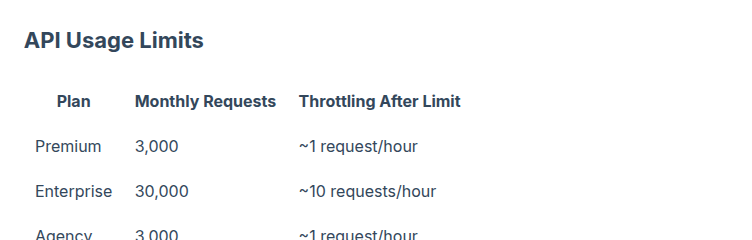
API usage limits by plan
The Vidalytics API Usage Limits table: Premium 3,000 monthly requests (throttled to ~1/hour after), Enterprise 30,000 (~10/hour), Agency 3,000 (~1/hour).

Source: help.vidalytics.com

What users actually say about Vidalytics

Research: unverified

Marketers praise analytics that tie playback to conversion points ↑ frequently praised

G2 reviewers highlight engagement analytics and where viewers convert, which matches the product's positioning for split testing VSLs rather than library hosting.

“Vidalytics gives you deeper analytics around engagement and where viewers convert.”

Ryan W. G2: Compare Vidalytics and Wistia

Thin but positive third party review footprint

Vidalytics shows a 4.9/5 score on G2 with a small review count (28 on the compare page), giving some outside proof for direct-response use but not at Wistia scale.

“Vidalytics gives you deeper analytics around engagement and where viewers convert.”

Ryan W. G2: Compare Vidalytics and Wistia

“Vidalytics is rated 4.9 out of 5.”

Anonymous G2: Vidalytics Reviews

What users say

On its own site, Vidalytics publishes named-customer testimonials, and they cluster on one theme: it wins split tests. Eric Raum, CEO of Lexapure, writes, "I love Vidalytics. Better pricing than Wistia, with WAY better analytics." Jon Benson, who is credited with inventing the video sales letter, says, "When I switched over, their Smart Autoplay increased my conversions by 30%." Treat those as vendor-selected, but the pattern (analytics and autoplay that move a conversion rate) is the same one that recurs in independent G2 reviews.

The critical side is quieter but consistent, and it is about billing rather than the product. On Trustpilot the sample is small and split, with the negative reviews focused on surprise bandwidth charges: a traffic spike or bot traffic can run up a per-GB overage that videos keep serving rather than shutting off. Support, by contrast, is a repeated positive on both Trustpilot and G2. The takeaway is not "avoid," it is "set a bandwidth ceiling and confirm overage handling before you scale paid traffic into it."

Pricing

Prices read on Vidalytics's own pricing page on 14 September 2026. The REST API is the line to watch: it unlocks on Premium, not before.

Plan Monthly Annual What it unlocks
Free $0 $0 3 videos, 50GB bandwidth, restricted analytics
Starter $24 $19/mo Unbranded player, smart playback, engagement analytics
Pro $79 $63/mo Heatmaps, segmentation, conversion tracking
Premium $149 $119/mo Vidalytics API, interactive Smart Vids, AI captions, multiple users
Enterprise Custom Custom Advanced Stats API filters, real-time, unlimited analytics

Bandwidth beyond your plan bills at $0.33 per GB on the standard paid plans, and Enterprise contracts can lower that rate. Every paid plan runs on a 14-day trial with no card.

Changelog

  • 14 Sep 2026 — First published. Read the vendor's pricing, integrations and API documentation, confirmed the two API layers and the Premium plan floor, and verified plan prices.

Frequently asked questions

Does Vidalytics have an API?
Yes. There are two layers. A client-side Player API runs on every embed and fires events (play, pause, timeupdate, ended, CTA and Play Gate) plus playback controls, on any plan. A server-side Public REST API and an Advanced Stats API let you manage videos, generate embed codes, sync viewer events to a CRM and pull analytics into a BI tool. The REST layer needs the Premium plan and above.
Which Vidalytics plan do I need for the API?
The Public REST API and Advanced Stats API start on Premium, which is $149 a month or $119 a month billed annually (checked 14 September 2026). The near-real-time endpoint and the advanced filters, segmentation and bulk queries in the Advanced Stats API require Enterprise. The JavaScript Player API needs no upgrade because it ships with the embed.
What can the Vidalytics REST API actually do?
Retrieve video data and metadata, rename and move videos, update settings and tags at scale, dynamically generate and customize embed codes, sync viewer interactions (plays, completions, opt-ins and conversions) to a CRM or automation tool, and pull timeline and segmented stats into Tableau, Looker, Power BI or a data warehouse.
Are there API rate limits?
Yes. Premium and Agency plans allow 3,000 requests a month, and Enterprise allows 30,000, with throttling to roughly one request an hour (ten on Enterprise) after the limit. Stats refresh every two hours except the near-real-time endpoint, bulk requests cover up to five video IDs, and the maximum date range is one month per call.
Can I automate Vidalytics without writing code?
Yes. The Player API and native integrations cover most marketing automation without the REST API: Zapier and Make move data to your CRM or email tool, and direct integrations exist for HubSpot, ActiveCampaign, HighLevel and others. Use the REST API when you manage many videos programmatically or feed a reporting stack, not just to tag a contact on watch time.
Is Vidalytics worth buying for the API alone?
Rarely. If you only need to fire watch events into a CRM, the free Player API and Zapier already do it on a cheaper plan. The REST API earns the Premium price when you run a multi-brand or multi-client setup, generate embeds dynamically, or pipe analytics into a BI tool. Buy Vidalytics for the conversion analytics first; treat the REST API as the layer that scales it.

Sources

From Vidalytics

Other sources

2 discussions and reviews read for this page. Quotes are excerpts; open a link to read the original in context.

  1. [g2-compare-wistia] Compare Vidalytics and Wistia G2,
  2. [g2-vidalytics-reviews] Vidalytics Reviews G2,

Related reading

Marcus Vale

Written by

Marcus Vale

Lead reviewer

Marcus Vale runs the VSLBench review desk. He has spent years buying paid traffic to video sales letters, and he now reads the player docs, pricing pages and long-term user reports to work out which tools actually move sales instead of just counting views. He writes the player and attribution reviews here, and he is the reason every ranking has to name the tool it is wrong for.

marcus@vslbench.com

Last checked 2026-09-14